· Регистрация 
софт скрипты драйвера форумы блоги  
Пример: windows
Софт
Новости софта
Обзоры
Статьи
Авторам
Софт
Mac Linux PDA/Mobile
Windows Безопасность Антивирусы

Страница программы a-squared (a2) HiJackFree 2.1.0.34

a-squared HiJackFree is a detailed system analysis tool which helps advanced users to detect and remove worms and spyware


  Описание программы   Комментарии (0)   Скриншоты (1)   Файлы (4)  
АвторEmsi Software GmbH
СайтПерейти
Обновление26.03.2007, 01:28
Названиеa squared HiJackFree
Версияa-squared (a2) HiJackFree 2.1.0.34
ЯзыкиАнглийский
ЛицензияFreeware
СтоимостьБесплатно 
СистемыWindows
Размер1.11 Мб
Рейтинг
Голосов: 1

Скачать бесплатно a squared HiJackFree
Закачек: 20
найти или купить на Allsoft.ru
софт в Allsoft.ru 


Описание программы a squared HiJackFree
a-squared HiJackFree is a detailed system analysis tool which will help advanced users to detect and remove all types of Spyware, HiJackers, Adware, Trojans and Worms.
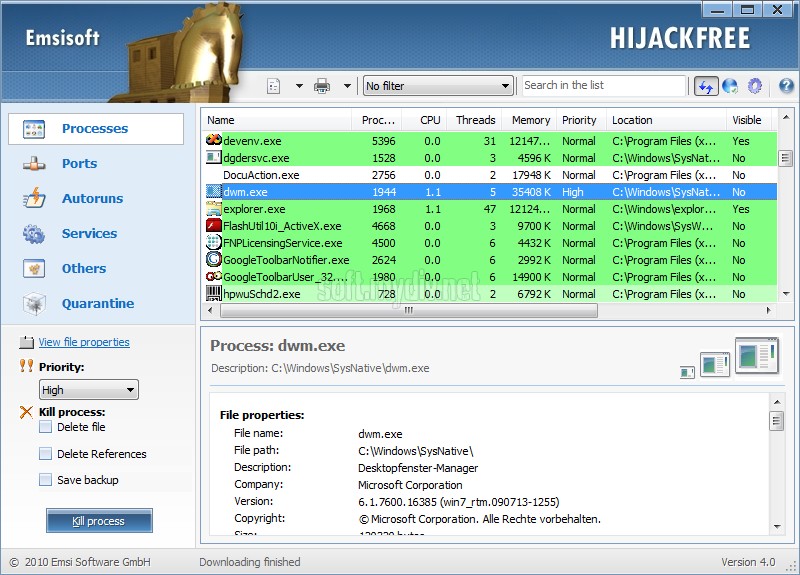
Running Processes
Like the Windows Task Manager, the a-squared HiJackFree Processes section lists all running processes. But additionally it shows tons of useful information at the details pane. File properties, loaded modules, online information and process details that indicate whether the program runs as a service, was started by an autorun entry or opens TCP and UDP ports.
Open Ports
The Ports section of a-squared HiJackFree shows all local open ports. An open port means that there is a process running which listens on the port number for input from outside.
The Ports Manager shows also the processes which listens on the ports so you can quickly see which processes must be shut down to close a specific port. You can kill a process and put it to quarantine for a later restore if needed.
Autoruns
View and edit all autorun entries. More than 30 different autorun locations are displayed and can be edited as well. Beside the default registry autoruns of the current user (HKCU) and all users (HKLM), a-squared HiJackFree also shows autoruns in files like win.ini, system.ini, autoexec.bat and config.sys. Additionally it lists all programs which are automatically run by the autorun start menu folder.
Autoruns can be deactivated temporarily or removed permanently.
The tricky autoruns cover all locations of the registry which are not mainly used to autorun files, but can also be used to start processes like the default screensaver path and others.
Services
With the included Service Manager you can easily see which services are installed and started. Additionally to the Windows Service Manager it shows the full path to the executable service file in the list to help identifying potential harmful services quickly. It also lists services that are not shown in the Windows Service Manager
Explorer- and Browser-Addons
The Addons section of a-squared HiJackFree allows you to view and edit plugins and addons of the Windows Explorer and Internet Explorer. Addons are mainly Browser Helper Objects (BHOs) which extend the functionality of the browser or additional Toolbars.
LSP Protocols
The LSP section shows all installed Layered Service Providers which are some kind of network drivers. Some spywares use LSPs to place ads on transferred website files you view with your browser.
Hosts File
The Hosts file contains the mappings of IP addresses to host names. This file is loaded into memory at startup, then Windows checks the Hosts file before it queries any DNS servers, which enables it to override addresses in the DNS.
You can use the Hosts file to redirect ad network server names to localhost to avoid ads on websites. Another 'feature' of the Hosts file is used by worms. Many of them use that file to redirect all requests to websites of Antivirus companies to localhost to avoid removal of the worm.
Active-X
The Active-X section shows all installed Active-X modules (DLLs) on the system. The list shows invalid references which can be removed.
Quarantine
When removing Malware, you may be in a situation where you are not completely sure if a program is really malicious or not. In such cases it is useful to remove a specific file or autorun, but keep a backup copy at the quarantine for a later restore. Check the "Save Backup" option when killing and removing a task at the Processes or Ports lists.
Online Analysis
The a-squared HiJackFree Online Analysis is a very powerful helper feature to see quickly which autoruns, processes, addons or open ports are harmful. You can click the "Refresh Online Data" button to get the online analysis directly at the program or you can also click the "Online Analysis" button at the right top of HiJackFree, to see a combined analysis web page. There a new brower window comes up with a detail analysis of your system configuration. The report is stored so you can also tell the web address of the report to specialists if needed
· Ключевые особенности и характеристики a-squared (a2) HiJackFree 2.1.0.34
· Manage all types of Autoruns on your system
· Control all Explorer and Browser plugins (BHOs, Toolbars, etc.)
· Manage all running Processes and their associated modules
· Control all Services, even those Windows doesn't display
· View open ports and the associated listening processes
· View all DNS entries in the hosts file
· Manage installed Layered Service Providers (LSPs)
· Analyze the system configuration with using our live online analysis
· Ограничения a-squared (a2) HiJackFree 2.1.0.34
Ограничения не определены
· Специальные требования a-squared (a2) HiJackFree 2.1.0.34
Специальные требования не определены
· История версий и изменений a squared HiJackFree
История пуста
· Описание и дополнения от редакторов и пользователей сайта
Пока нет
Связанные статьи, обзоры и новости
Нет относящихся к программе статей и обзоров.


Другие программы от Emsi Software GmbH

a-squared Anti-Malware 2.5.0.195 Beta
a-squared (a2) Personal: Protects the PC against malicious software: Trojans, Dialers, Worms, Spyware
24.04.2007, 00:46 | 16.3 Мб | Trial | 5


a-squared Free 2.5.0.258 Beta
a-squared scans the computer for malicious software: Trojan Horses, Dialer, Worms, Spyware
24.04.2007, 01:35 | 13.1 Мб | Freeware | 13


a-squared Command Line Scanner 2.0.0.103
a-squared Command Line Scanner is a console application to scan your PC
20.10.2006, 02:04 | 10.5 Мб | Freeware | 3


a-squared Anti-Dialer 2.0.0.352
a-squared Anti-Dialer - protect your PC from manipulated dial up connections
20.10.2006, 03:17 | 2.79 Мб | Demo | 1

     
Похожие программы

Dr.WEB CureIt! 4.44.5
Бесплатное и средство для лечения компьютеров от вирусов, руткитов, троянских программ, шпионского ПО и разного рода вредоносных объектов
13.09.2008, 10:27 | 10.75 Мб | Freeware | 49


ViGUARD Pro 11.1427
ViGUARD is an IPS solution (Intrusion Protection System) used by government and military institutions
09.06.2007, 07:29 | 9.25 Мб | Demo | 61


ViGUARD 11.1427
ViGUARD is an IPS solution (Intrusion Protection System) used by government and military institutions
09.06.2007, 05:29 | 9.2 Мб | Demo | 3


PCSafer 3.00
This software is an application of Internet safety and it helps scan in real time your machine to protect from parasite
03.06.2007, 08:05 | 4.78 Мб | Shareware | 7


HandyBits VirusScan Integrator 5.5.0.207
VirusScan Integrator allows you to scan the same files with several antiviral programs
30.05.2007, 09:51 | 1.56 Мб | Freeware | 19

Разделы