

- Описание
- Возможности
- Ограничения
Business Card Designer Plus позволит распечатать отличные визитки на любом, совместимом с Windows принтере.
Эта программка предназначена для создания визиток за считанные секунды.
Автор обзора
:
Сергей Нечаев, 24.12.2022
Оценка:
Ключевые особенности и функции
- программа работает очень быстро: используя мастер создания визиток можно получить необходимую визитную карточку через несколько секунд, используя эту весьма популярную программу для создания визиток;
- поддержка ЛЮБЫХ заготовок: американский размер, метрический размер или размер по умолчанию. Карточки любого размера в диапазоне от 1 до 4 дюймов;
- поддержка любых стилей: широкие, высокие, двусторонние, фотокачество, складываемые в Визитные карточки на дисках CD-R;
- функции принтера по умолчанию: печатает любое количество визиток с любым расположением на листе на любом совместимом с Windows принтере;
- удобные формы: линии, прямоугольники, треугольники, эллипсы, ромбы и другое;
- эффекты текста: по спирали, лучеобразный, аркой, любого размера. Смена шрифтов, размеров, цвета, стиля, тени, вращение. Вы можете использовать штрихкод;
- градиент и структура: в программе вы сможете использовать градиентную заливку или выбрать фоновое изображение;
- графические эффекты: вырезание, зеркальное отображение, поворот, негатив, шумы, гамма, прозрачный фон и т.д.
Ограничения бесплатной версии
- тестовая версия работает только 15 дней;
- функция печати отключена;
- окно напоминания.
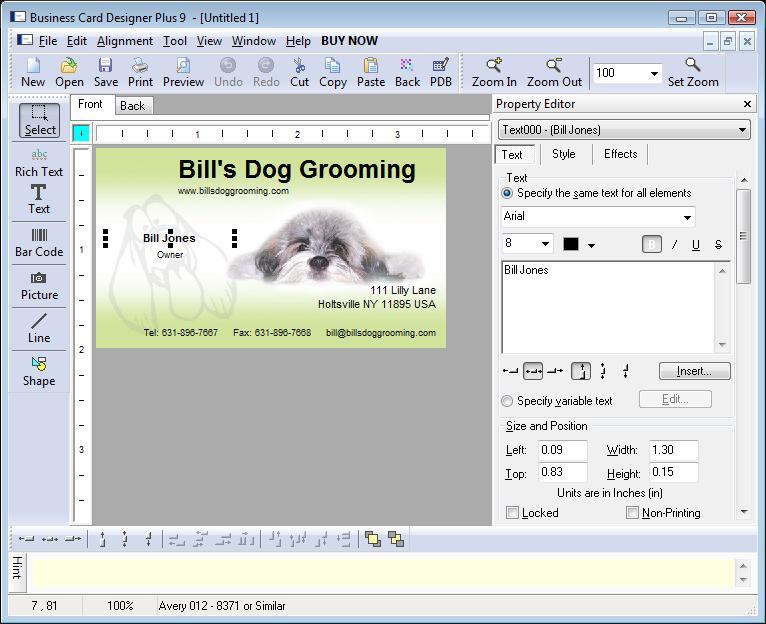
Скриншоты и видео:
| Категория: | |
| Системы: |
Windows
|
| Размер: | 5,2 Мб |
| Автор: | CAM Development ( Сайт) |
| Языки: |
Английский
|
| Лицензия: |
Trial
(Платная)
|
| Обновление: | 24.12.2022 |
| Версия: | 22.11.0 |
Новые отзывы о Business Card Designer Plus
Хороших отзывов пока нет. Оставьте свой и помогите другим с выбором!
Добавить отзыв
Наборы c этой программой
» Программы для создания визиток
Программы, которые позволяют создавать красивые визитные карточки без помощи профессиональных дизайнеров.
Вопросы и ответы по программе
Пока нет вопросов о «Business Card Designer Plus». Ваш может стать первым!
Задайте свой вопрос!


