

- Описание
- Ограничения
- Требования
- Что нового
Зачастую, когда вам необходимо сделать качественный видеоролик или видеопрезентацию, потребуется не только приложить значительные усилия, но и использовать профессиональное программное обеспечение, ярким представителем которого является видеоредактор SONY Vegas Pro.
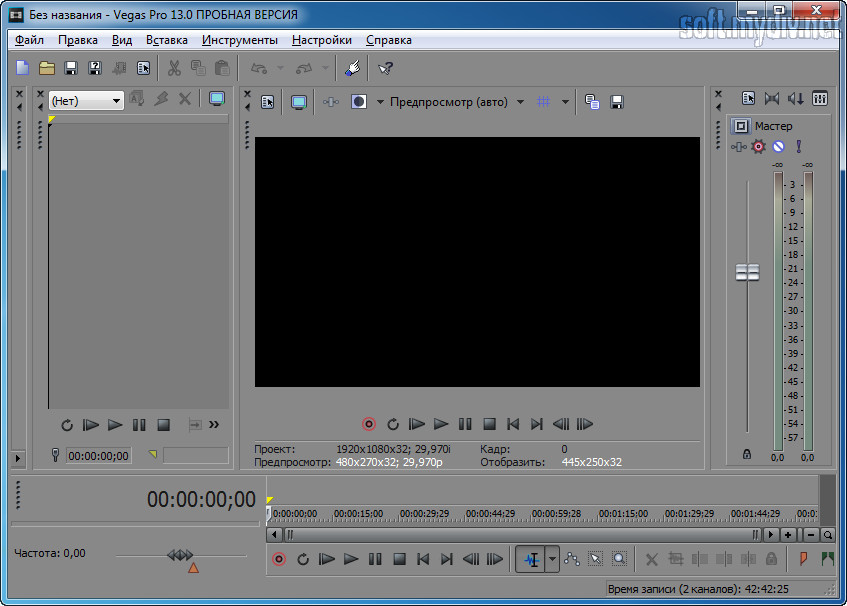
Главное окно SONY Vegas Pro начинающим пользователям, да и не только им, с первого взгляда может показаться слишком сложным. Однако используя представленные возможности, вы без труда освоите интерфейс и поймете роль каждого инструмента.
Функционал программы способен удовлетворить самого требовательного пользователя. Помимо профессиональной обработки видео в число возможностей программы входит запись Blu-Ray и DVD дисков, возможность работать с видеофайлами с разрешением вплоть до 4096х4096, поддержка всех мыслимых форматов видео и создание цельных роликов из фрагментов видео различного размера и разрешения. Кстати количество фрагментов добавляемых в ходе работы ограничено лишь возможностями вашего компьютера.
При работе с проектами пользователям предоставляется широкий выбор инструментов, с помощью которых можно создавать клипы и ролики профессионального качества. Управление программой возможно не только с помощью мыши, но и с клавиатуры. При редактировании видео поддерживается технология drag-and-drop.
Несмотря на то, что первоначально программа разрабатывалась для профессионалов (таких как веб-разработчики и 3D-художники), она подойдет и начинающим пользователям. Благодаря более чем 200 включенным в программу визуальным эффектам, в числе которых новейшая коллекция световых эффектов, даже новички смогут придать своим клипам профессиональный вид. С помощью этого видеоредактора вы без труда смонтируете видеоролик любой сложности и сможете наложить на видео нужное вам звуковое сопровождение.
Еще одной интересной функцией значительно помогающей в монтаже итогового видео, является возможность одновременной работы с записями нескольких камер. Благодаря клавиатурным сокращениям вы можете быстро переключаться между 32 доступными источниками.
SONY Vegas Pro поддерживает редактирование видео в 32 битном режиме. При этом, для ускорения, основную работу по редактированию вы можете делать в 8-битном режиме, а в 32-битный приключаться при финальной обработке.
Стоит отметить, что при редактировании видео поддерживаются любые пропорции экранов и частота кадров. Например, в одном проекте вы можете одновременно работать с форматом 4:3, 16:10, 16:9 видео с частотой кадров 23.976, 24, 29.97 или 30 fps. В ходе работы с видео возможна быстрая корректировка цвета с помощью вращающегося цветового диска, а окончательная доводка, для устранения различий между различными фрагментами ролика – с помощью цветовых фильтров.
В заключение хочется отметить, что любой пользователь, работающий с мультимедиа, просто обязан попробовать SONY Vegas Pro.
Ограничения бесплатной версии
- 30 дней работы без регистрации.
Специальные требования
- 64-разрядная операционная система;
- четырехъядерный процессор Intel Core i5 с тактовой частотой 2,5 ГГц (рекомендуется восьмиядерный Intel Core i7 или аналогичный от AMD);
- 1,5 Гб свободного места на диске для установки программы;
- SSD-накопитель для работы с 4K видео;
- 8 Гб оперативной памяти (рекомендуется 32 Гб для 4К видео);
- USB 2.0 для импортирования видео форматов AVCHD, XDCAM EX, DVD;
- Windows-совместимая звуковая карта;
- видео карта NVIDIA серии 9xx с 4 Гб ОЗУ, AMD/ATI или Intel HD Graphics 530 (рекомендуется видеокарта с 8 Гб видеопамяти для 4К видео);
- установленный Microsoft .NET Framework 4.0 SP 1;
- QuickTime 7.1.6 или более новой версии.
Что нового в этой версии?
- добавлена функция "апскелинга" видео в разрешении 1080p до 4K;
- добавлена поддержка камер RED;
- добавлены скрипты группировки событий для видео и аудио;
- добавлена возможность выбора режима ресемплинга;
- добавлена возможность быстрого стирания кадров в триммере.
Скриншоты и видео:
| Категория: | |
| Системы: |
Windows
|
| Размер: | 6 Мб (онлайн-загрузчик) |
| Автор: | MAGIX ( Сайт) |
| Языки: |
Русский
|
| Лицензия: |
Trial
(Платная)
|
| Обновление: | 02.11.2022 |
| Версия: | 20.0.0 Build 214 |
Новые отзывы о SONY Vegas Pro
2. Понятный и продуманный интерфейс. До Sony Vegas Pro я пытался взяться за Adobe Preemier и в его интерфейс просто-напросто потерялся. Здесь все интуитивно понятно даже несмотря на огромный функционал, не уступающий конкуренту от Adobe.
3. В сравнении с другими программными продуктами ...Читать далее
2. Если вы хотите сохранять видео в формате AVCHD без пересжатия, то здесь это не представляется возможным.
3. Количество эффектов и переходов "по умолчанию" невелико, поэтому для хорошего монтажа вам ПРИДЕТСЯ скачивать необходимые инструменты из интернета или вовсе покупать ...Читать далее


