
Обзор

- Описание
- Ограничения
- Требования
- Что нового
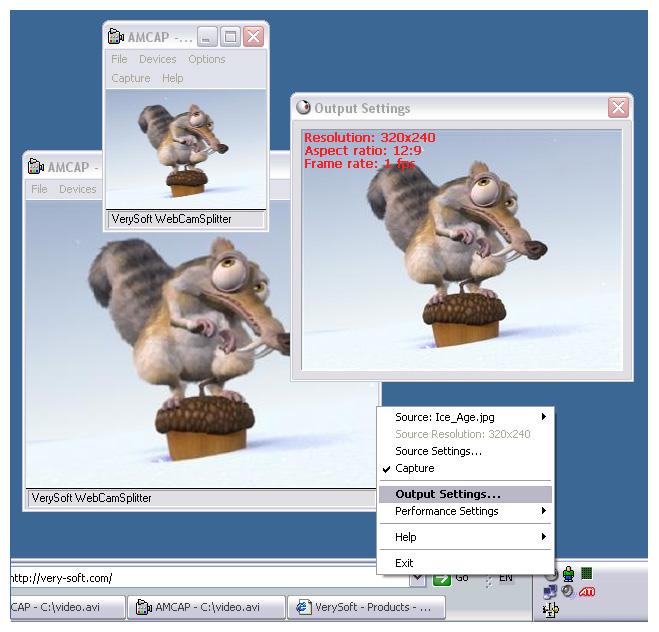
WebCamSplitter - это утилита, которая позволяет обойти ограничение Windows на одновременное использование одной веб-камеры несколькими приложениями.
Чтобы обойти этот запрет программа устанавливает собственный драйвер веб-камеры, который нужно будет выбрать как источник видеосигнала в соответствующих программах (драйвер называется Verysoft WebCamSplitter). Затем берет управление устройством веб-камеры на себя, разделяет трансляцию на несколько потоков и отправляя их через виртуальный драйвер.
Также в программе есть несколько других полезных функций. Можно передавать изображение с рабочего стола или проигрывать файлы мультимедиа, изменять масштаб и разрешение, сохранять кадры в JPEG, изменять цвет, добавлять текст и многое другое.
Автор обзора
:
Сергей Нечаев, 29.07.2018
Оценка:
Ограничения бесплатной версии
- 15-дневный пробный период;
- через определенный интервал на видеотрансляции появляется сообщение о незарегистрированной версии.
Специальные требования
- установленный DirectX 8.0 или более новый;
- DirectX-совместимое видеоустройство;
- поддержка RGB24 или IYUV цветовой гаммы;
Что нового в этой версии?
1.6.312
(11.09.2016)
- добавлена поддержка разрешения 3840x2160;
- дополнительный опции для настройки накладываемого текста;
- добавлено новые имена переменных для даты, времени и так далее;
- добавлена возможность следить за пропущенными FPS;
- исправлена проблема при запуске на 64-битных системах;
- исправлена проблема с перезапусками программы;
- исправлена проблема с запуском справки;
- исправлена ошибка при работе с камерой Logitech HD Pro Webcam C920;
- исправлена работа программы в 32-битной Windows XP.
Скриншоты и видео:
| Категория: | |
| Системы: |
Windows
|
| Размер: | 3 Мб |
| Автор: | VerySoft LLC ( Сайт) |
| Языки: |
Английский
|
| Лицензия: |
Shareware
(Платная)
|
| Обновление: | 29.07.2018 |
| Версия: | 1.6.351 |
Новые отзывы о WebCamSplitter
Хороших отзывов пока нет. Оставьте свой и помогите другим с выбором!
Добавить отзыв


